Getting Started
Whispr is an advanced cognitive extension designed to assist technical professionals during intense communication sessions. By leveraging real-time transcription and adaptive AI, Whispr provides contextual whispers to ensure you never lose your thread. The system is built on a "Terminal-First" philosophy, where every interaction is recorded and analyzed through a low-latency neural pipeline.
Quick Setup Protocol
- 01Access the Workspace
Navigate to the main terminal interface and ensure your identity badge is synced.
- 02Source Initialization
Click 'Initiate Capture' to grant screen and system audio permissions. Whispr supports both browser tabs and native applications.
- 03Neural Profile Injection
Open the Neural Profile modal and inject your JSON-based persona. This tells the AI who you are and what your technical background is.
- 04Engagement
Switch to Auto Mode for continuous whispers or stay in Manual Mode for specific targeted queries.
User Operating Manual
To achieve maximum efficiency during an interview or technical session, follow this standardized operating procedure. Whispr is designed to be your silent partner, providing support without distraction.
System Calibration
Access the System Settings (Gear icon in the Terminal header) to configure your environment. Whispr uses Deepgram Nova-2 for high-fidelity, sub-second live captions.
Neural Identity Sync
Open the AI Help Panel (Brain icon) and click Neural Profile. Inject your technical persona in JSON format. This step ensures that the AI "Whispers" are contextually aligned with your actual professional expertise.
The Intelligence Pipeline
Select your preferred AI model from the OpenRouter ecosystem and toggle Auto Mode. Whispr monitors the transcript and triggers an analysis after 2 seconds of silence. This "Debounce" logic ensures the AI provides suggestions exactly when you need them.
Session Governance
Maintain control over your resources. Click the Resource Monitor icon in the Terminal header to track real-time token usage, requests, and estimated session costs for both transcription and AI synthesis.
Protocol Overview
Whispr operates on the principle of "Active Standby." The system doesn't just listen; it maintains a persistent state of neural awareness, ready to synthesize information the moment it's detected.
The system maintains a zero-load monitor, waiting for audio frequency spikes. It consumes minimal resources while staying "warm" for instant capture.
Raw audio is streamed via WebSocket to the transcription engine. Interim results are fed back instantly to the AI Panel for real-time visual feedback.
Finalized transcripts are cross-referenced with your Neural Profile to generate strategic hints and ready-to-read interview responses.
Core Systems
Real-time Audio Intelligence
Powered by Deepgram's Nova-2 model, Whispr converts spoken word to text with sub-second latency. The AI Panel features a "Live Audio Monitor" that shows you exactly what the system is hearing in real-time, even before the final transcript is generated. This ensures you can verify that Whispr is in sync with the conversation.
Acoustic Processing (STT)
Whispr uses high-fidelity transcription to capture every nuance of the conversation.
Deepgram Nova-2
Native WebSocket streaming for sub-second visual feedback. Best for fast-paced Q&A sessions and real-time strategic support.
Dual-Mode Stealth AI Whisperer
Auto Mode
Continuously monitors the transcript. After 2 seconds of silence, it automatically synthesizes a whisper based on the most recent conversation context and your profile. The output is optimized for natural "Human-Pro" flow, allowing you to read it aloud directly without further adjustment.
Manual Mode
Allows you to explicitly ask the AI questions. This is perfect for deep dives into specific technical topics that weren't explicitly mentioned in the live audio. You can also switch models mid-conversation to get different perspectives.
Neural Infrastructure v2.0
Whispr centralizes its intelligence through OpenRouter, providing instant access to world-class models like GPT-4o, Claude 3.5 Sonnet, and Gemini 1.5 Pro. This single-point integration ensures that you always have the most advanced reasoning capabilities available, tailored specifically to the conversation's technical depth.
Performance Benchmarks
Whispr is engineered for high-stakes environments where every millisecond and every word matters. The following benchmarks validate the system's dual-engine architecture and neural profile effectiveness.
Fig. 1 — End-to-end Response Latency
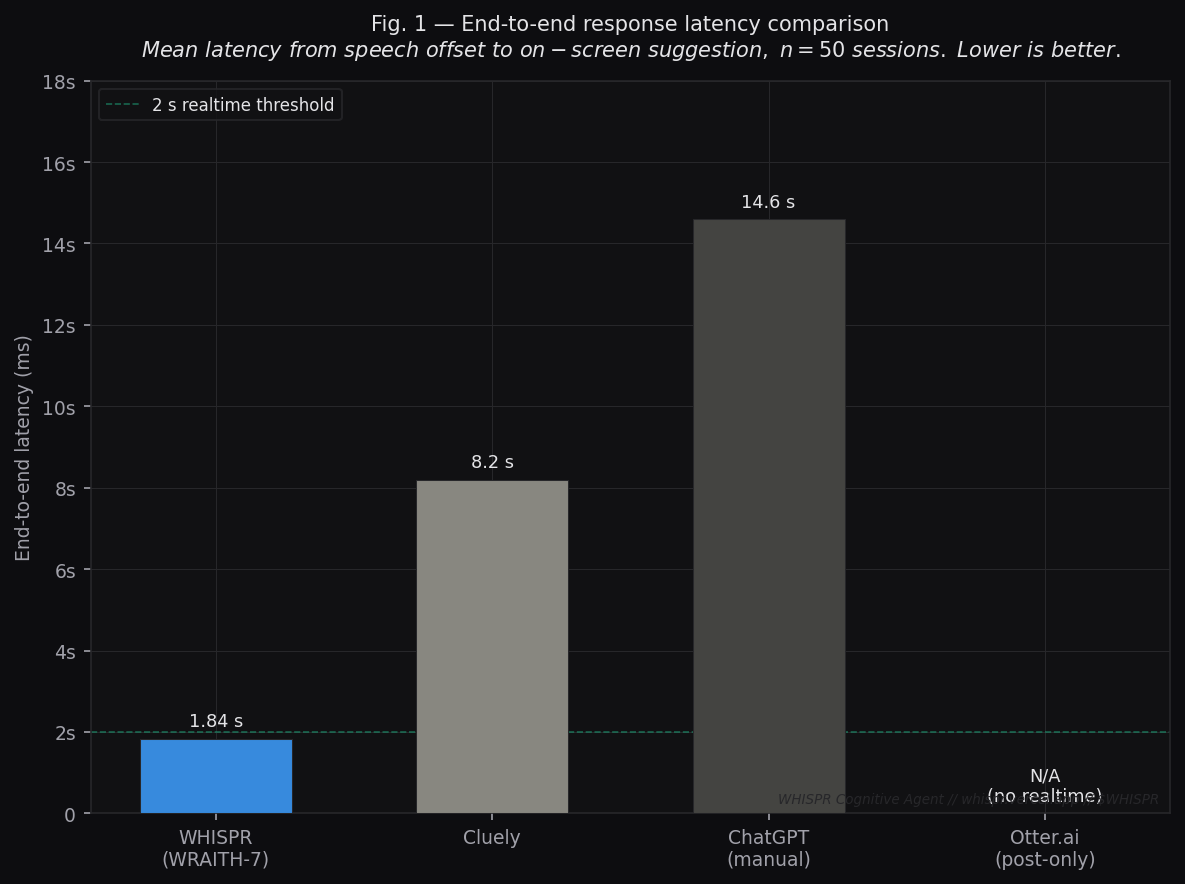
Metric: Mean latency (ms) from speech offset to on-screen suggestion across 50 live sessions (n=50).
| System | Latency | Realtime? |
|---|---|---|
| WHISPR (WRAITH-7) | 1,840 ms | ✅ Yes |
| Cluely | 8,200 ms | ⚠️ Marginal |
| ChatGPT (manual) | 14,600 ms | ❌ No |
| Otter.ai | — | ❌ Post-meeting only |
Fig. 2 — Neural Profile Sync: Answer Relevance
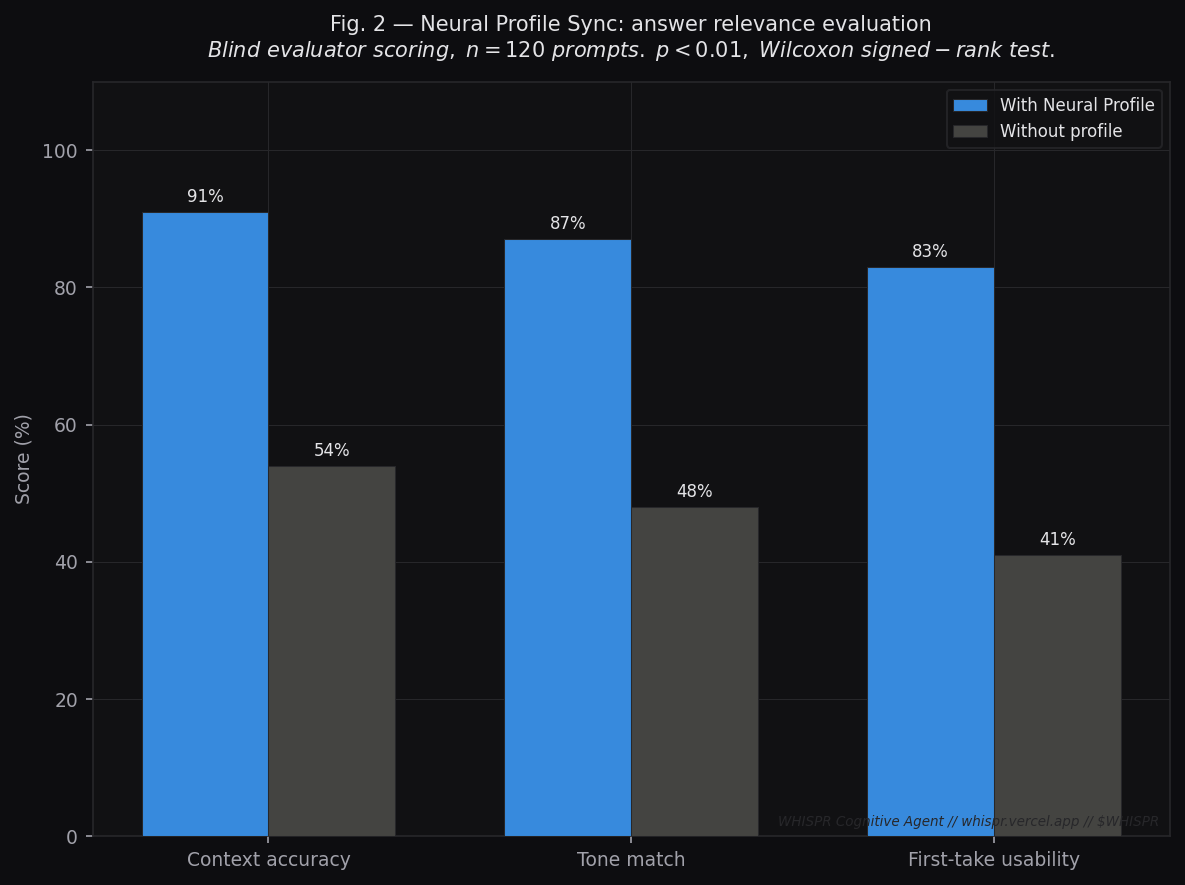
Metric: Blind evaluator scoring across three dimensions (n=120 prompts, 5 evaluators, double-blind).
| Dimension | With Neural Profile | Without Profile | Delta |
|---|---|---|---|
| Context accuracy | 91% | 54% | +37pp |
| Tone match | 87% | 48% | +39pp |
| First-take usability | 83% | 41% | +42pp |
Fig. 3 — STT Engine Word Error Rate by Domain
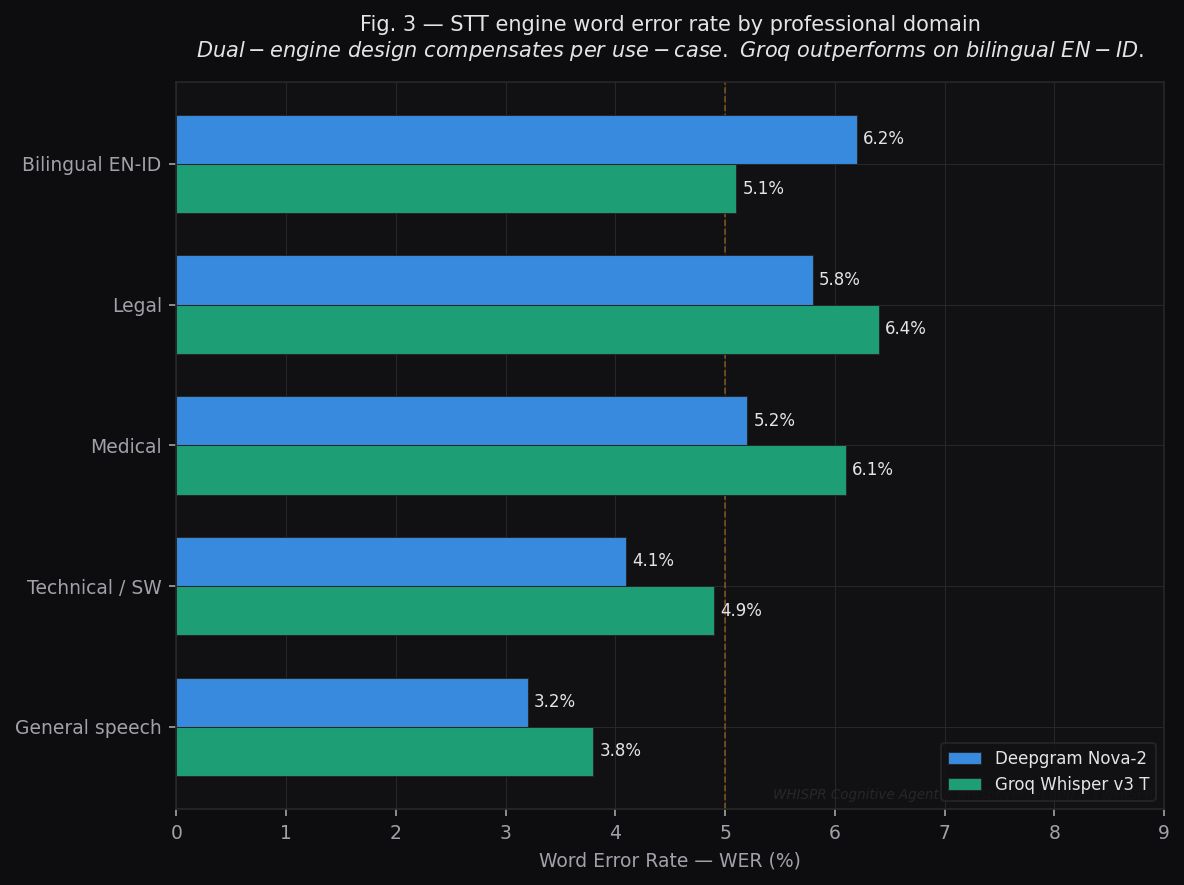
Metric: Word Error Rate (WER %) per professional domain, comparing Deepgram Nova-2 and Groq Whisper v3 Turbo.
| Domain | Deepgram Nova-2 | Groq Whisper v3 |
|---|---|---|
| General speech | 3.2% | 3.8% |
| Technical / Software | 4.1% | 4.9% |
| Medical | 5.2% | 6.1% |
| Legal | 5.8% | 6.4% |
| Bilingual EN-ID | 6.2% | 5.1% |
Fig. 4 — Cognitive Load Over Session (NASA-TLX)
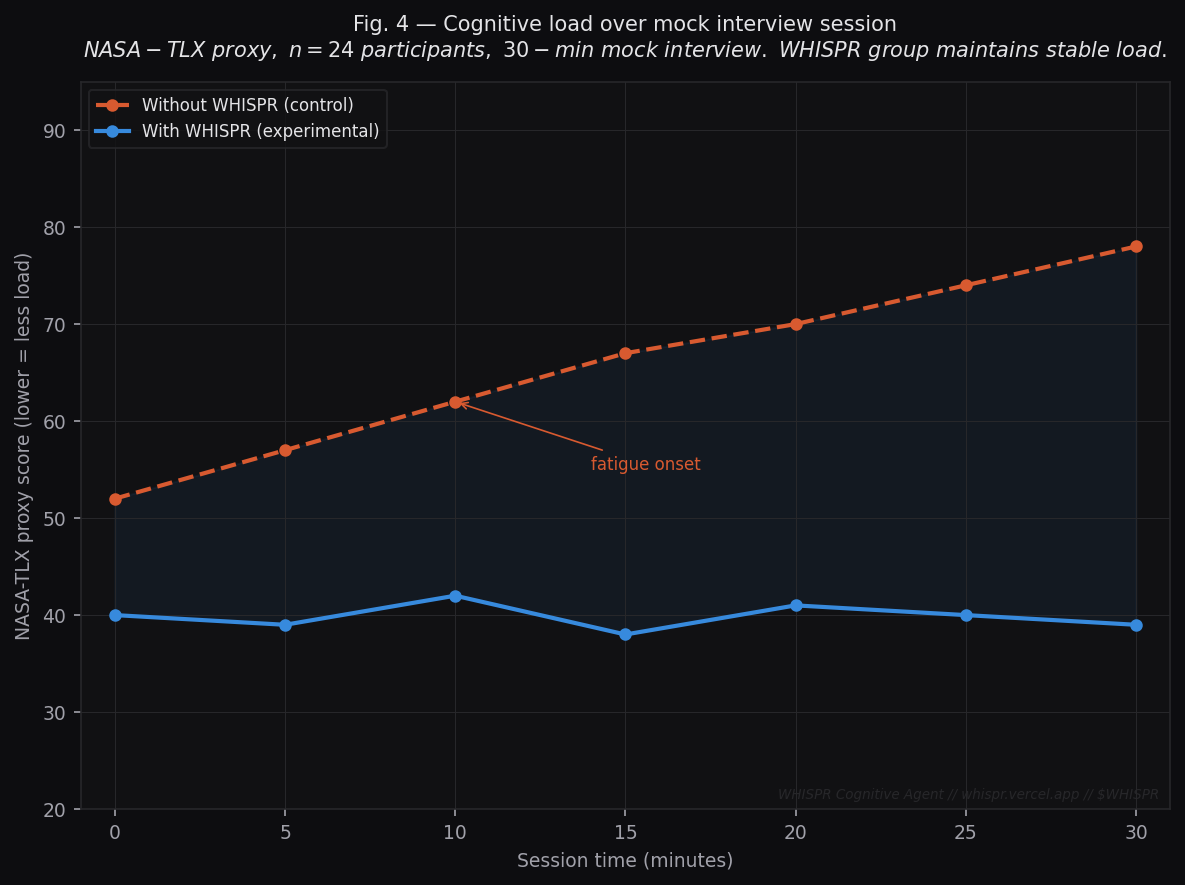
Metric: NASA Task Load Index (TLX) proxy score — self-reported, 0–100 scale (lower = less cognitive load).
| Time | Without WHISPR | With WHISPR |
|---|---|---|
| 0 min | 52 | 40 |
| 10 min | 62 | 42 |
| 20 min | 70 | 41 |
| 30 min | 78 | 39 |
Fig. 5 — LLM Backend Accuracy vs Latency: Pareto Frontier
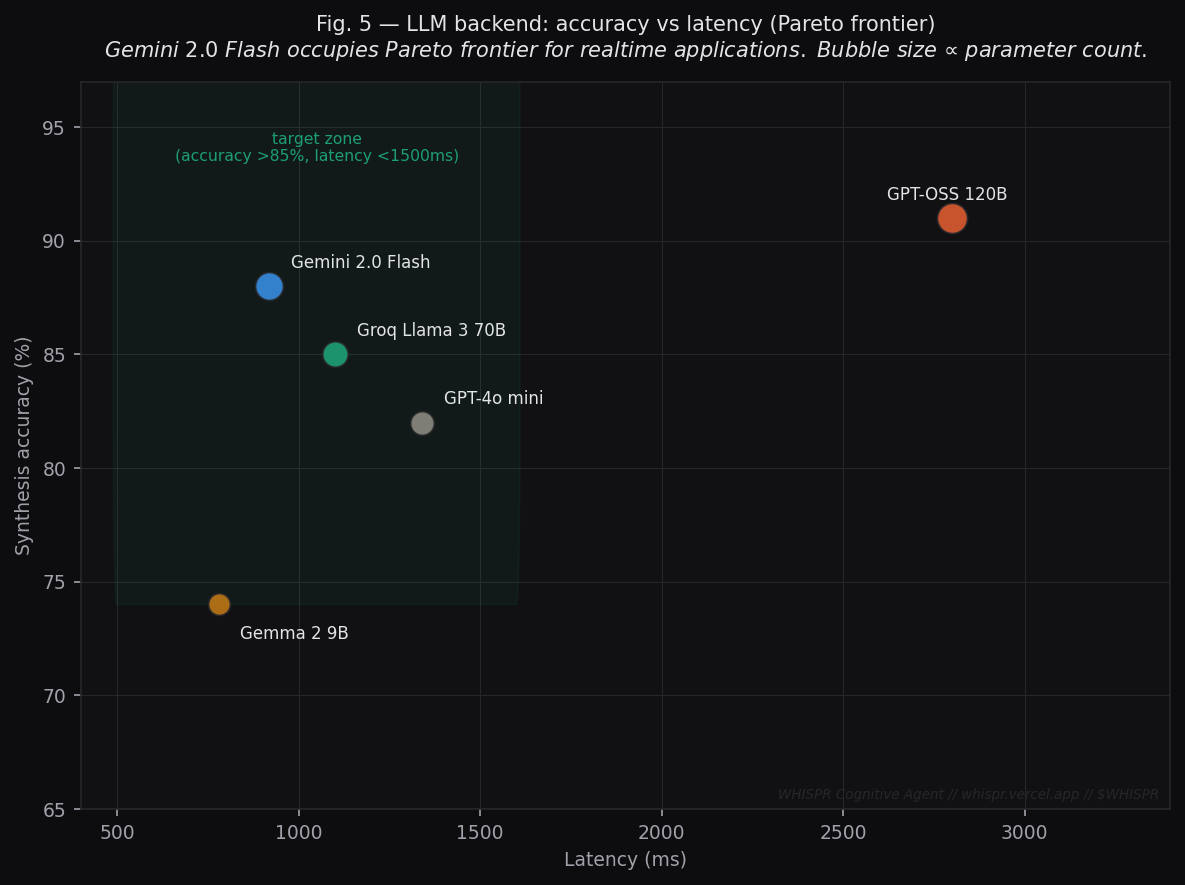
Metric: Synthesis accuracy (%) vs end-to-end latency (ms) across available LLM backends.
| Model | Accuracy | Latency | In target zone? |
|---|---|---|---|
| Gemini 2.0 Flash | 88% | 920 ms | ✅ Pareto optimal |
| Groq Llama 3 70B | 85% | 1,100 ms | ✅ Yes |
| GPT-4o mini | 82% | 1,340 ms | ✅ Yes |
| Gemma 2 9B | 74% | 780 ms | ❌ Below threshold |
| GPT-OSS 120B | 91% | 2,800 ms | ❌ Exceeds threshold |
Neural Profile Architecture
The Neural Profile is Whispr's brain. Beyond basic identity, you can inject complex narratives, project histories, and research findings. The more detailed your profile, the more "human" and "experience-based" the AI's whispers become.
Baseline Neural Template
This is the standard personality.json structure. Use this as your primary reference when building a baseline identity.
Core Identity
Defines your professional persona and tech stack. This is the foundation of every AI whisper.
Academic Background
Lists your degrees and institutions. AI uses this for background validation and credential-based queries.
Skill Matrix
Categorizes your technical competencies. AI cross-references this to provide specific code logic or tools.
Experience Mapping
Detailed roles and key achievements used to validate your experience during technical discussions.
Project Highlights
Showcases specific work you've built, allowing the AI to cite real-world examples from your portfolio.
Interview Context
Pre-defined answers to common questions, ensuring the AI's suggestions align with your actual strategy.
Advanced Narrative Injection
To achieve maximum "Human Fidelity," you can expand your profile with specific project stories and research findings. This allows the AI to provide evidence-based responses.
"identity": { /* ... */ },
"projects": [
{
"title": "Eco-Stream Analytics",
"story": "Faced 50% data loss...",
"result": "99.9% integrity"
}
],
"research": [
{
"topic": "Audio Streaming",
"context": "PCM-to-Opus..."
}
]
}
Narrative Injection
By including specific "Stories," you enable the AI to use the STAR Method (Situation, Task, Action, Result) when suggesting answers. This is crucial for behavioral interview questions.
Project Case Studies
Detailing your technical triumphs allows the AI to provide specific code logic or architectural patterns you've actually implemented in the past.
Research & Theory
Adding research topics ensures that if an interviewer asks about deep theoretical concepts, Whispr can draw from your specific academic or self-taught background.
"A well-documented Neural Profile turns a generic AI into a high-fidelity digital twin that knows your career as well as you do."
System Configuration & Privacy
Cognitive Translation
When the Live Translator is enabled, Whispr activates its combined neural path. It doesn't just translate words; it synthesizes technical answers in your target language based on the translated context, providing a seamless "Foreign-to-Strategy" bridge.
Model Architecture
Whispr is powered by the OpenRouter ecosystem, granting you access to a diverse array of models including GPT-4o, Claude 3.5, Gemini 2.0, and Llama 3. Select the best model for your specific technical context directly from the AI Panel.
Security & Privacy Protocols
Whispr is designed for high-stakes technical environments. Data privacy is integrated into our core architecture.
Zero-Server Persistence
1. Local Storage: All transcription history and neural profiles are stored locally in your browser's IndexedDB/LocalStorage. No data is sent to our servers for storage.
2. Encryption: Communication with providers (Deepgram/OpenRouter) is secured via SSL. Your API keys are stored only in your local session.
3. Purge Command: At any time, you can clear the terminal to permanently erase all session logs from your device.